How to Take Bookings Online (2026): 7 Steps to Stop Chasing Calls
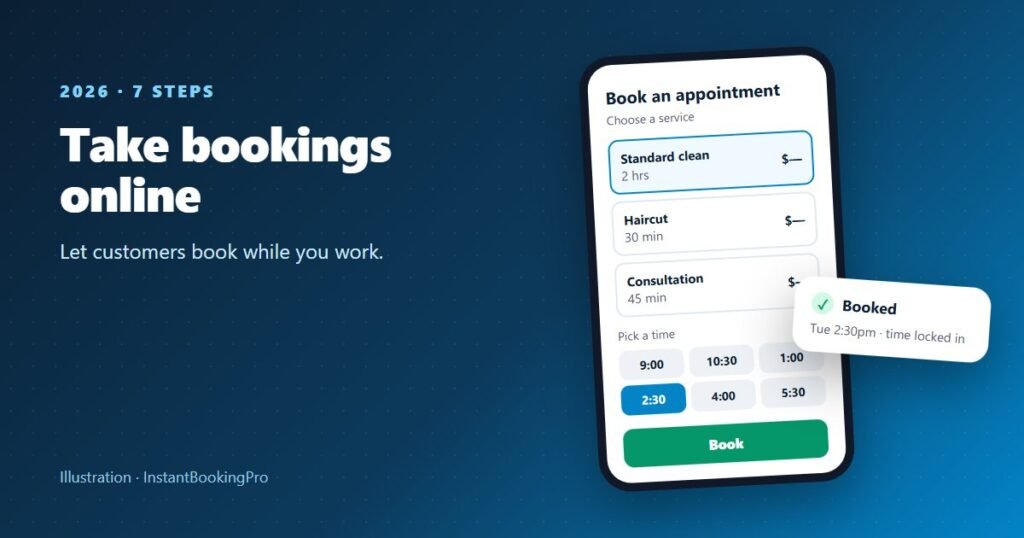
To take bookings online, list your services with set durations and prices, connect them to a calendar that shows your real availability, and share your booking link wherever customers already find you: your Google Business Profile, your website, your Instagram bio and your missed-call texts. Customers pick a free time and book themselves, and the time disappears for everyone else. You can set this up yourself with self-serve software, or have it done for you: InstantBookingPro builds your branded booking page, typically live within 24 hours, from $59 a month including GST.
How do online bookings work?
An online booking system has three parts: a public booking page that lists your services, durations and prices; a live calendar of your real availability; and the confirmation the customer gets when they book. A customer finds your link, picks a service, sees only the times that are genuinely free, and books one. That time instantly disappears for everyone else, the booking lands in your calendar, and you didn’t have to pick up the phone.
The defining feature is that the booking page and your calendar are the same source of truth. That’s what separates a real booking system from a contact form with a calendar picture on it, and it’s why double bookings become impossible rather than merely unlikely.
Is it worth it for a small business? If your jobs are rare, large and always negotiated, maybe not yet. But if you miss calls while you’re working, spend evenings returning messages or get enquiries after hours, a booking page can capture jobs you’d otherwise lose. Start by working out what missed calls cost you.
How to take bookings online in 7 steps
- Decide what’s bookable online Fixed-scope services, such as a one-hour massage, a standard house clean or a 30-minute consult, have a predictable time and price, so customers can book them instantly. Jobs you need to see before pricing can stay off the page: quote those by phone or email, and put your booking link at the bottom of every quote so saying yes takes one tap.
- Define services, times and prices precisely Name each service the way a customer would say it, not in your internal jargon. Set the time it really takes, including pack-down and travel if you go to the customer. If a “one-hour” job always runs 75 minutes, book it as 75 minutes, or your day runs later with every job.
- Set your real availability, not your wishful availability Map out when you’ll genuinely take jobs: working days, start and finish times, breaks and standing commitments. If you have staff, set hours for each person. Customers must be able to trust every time they see.
- Choose self-serve software or done-for-you setup Self-serve tools let you build the page yourself over a few evenings; done-for-you services build it from your service list. Either way, check for real-time availability, a confirmation for every booking and a calendar for each staff member if you have a team. Our comparison of booking systems in Australia lists current AUD prices.
- Put the booking link everywhere customers already are Add it as a booking link on your Google Business Profile, a “Book now” button on your website, the link in your Instagram and Facebook bios, your email signature, invoices and quotes. Our step-by-step guide shows how to add a Book now button to Instagram and Google.
- Cut no-shows Make sure every booking gets a confirmation with the time, address or arrival instructions, and your cancellation policy. Many businesses also send a reminder the day before. Some booking systems do that automatically; if yours doesn’t, a quick text from your phone does the same job.
- Review the numbers weekly Ten minutes a week on reports tells you which services and days fill first, who’s at capacity, and when to raise prices or hire. This is where booking software with a built-in mini CRM earns its keep: customer records and booking history build themselves from bookings.
Tip: Set up a missed-call text-back as part of step 5: a text to any call you can’t answer, such as “Sorry we missed you. Book a time that suits at [link].” Many phone plans and apps can send it automatically, and it catches callers before they ring the next business.
What is the best free online booking system?
Several systems have free plans: Square Appointments (for a single location), SimplyBook.me (up to 50 bookings a month), Zoho Bookings (one user) and Setmore (up to four users), as published in October 2026. Free plans suit people happy to set up and maintain the system themselves, and they usually limit bookings or staff, or charge for card payments and SMS. We compare what you actually pay in our booking software cost guide.
Self-serve booking tools vs done-for-you setup
Both paths end in the same place, a working booking page, so the real question is who builds and maintains it.
Self-serve tools are the cheaper entry point, and good if you have the time and confidence with tech. Budget a few evenings to set up services, availability, notifications and branding properly, plus ongoing tinkering as your business changes.
Done-for-you setup suits owners who want the result without the software project. InstantBookingPro takes your services, prices and staff hours and builds your branded booking page and admin console for you, typically live within 24 hours. It costs more per month than a free plan; that’s the trade, money for evenings. See how it works for salons and barbers, car washes and detailers and cleaning businesses, or try the live booking demo.
Starting a new business and need a website too? See our website and booking package for new service businesses.
Common mistakes to avoid
- Using a contact form and calling it online booking. If you still have to ring back to confirm a time, you’ve kept all the phone tag and added a step.
- Showing availability you can’t honour. One “sorry, that time’s actually gone” message costs more trust than the booking was worth.
- Hiding the link. If a customer has to hunt for how to book, some won’t bother.
- Set and forget. Update your availability when life changes: school holidays, new staff, leave.
Watch out: The most important feature to check before paying for anything is real-time availability. If the answer to “what happens when two people want the same time?” involves you, keep looking.
Want it done for you? Send us your services and hours and we’ll build your branded booking page and admin console, typically live within 24 hours. From $59 a month including GST.
Frequently asked questions
How do I start taking bookings online?
Do I need a website to take bookings online?
Is there a free online booking system?
Will older customers actually book online?
How do I stop double bookings?
Does online booking reduce no-shows?
Get instant online bookings
We build and launch your branded booking system for you — typically live within 24 hours.